



How Does Local Tone Mapping in HDR10+ ADVANCED Differ From Standard Tone Mapping?
Every HDR format has to solve the same basic problem: real-world scenes contain a much wider range of brightness than any display can reproduce, so the source content has to be “mapped” down to what a given TV or monitor can actually show. Standard tone mapping in HDR10+ handles this at the level of the whole scene or frame — one curve, applied everywhere. Local Tone Mapping, introduced in HDR10+ ADVANCED, goes a step further by letting that curve vary within a single frame.
Why a single tone-mapping curve isn’t always enough
Not every part of a frame has the same brightness needs. A sunset might have a blazing bright sky sitting right next to a dark foreground silhouette; a nighttime scene might need to preserve detail in a dim room while a bright doorway in the background stays true to its own tone. Cinematographers call this range of light and dark within a scene dynamic range, and it isn’t evenly distributed — the brightest highlights and darkest shadows are often the areas most likely to lose detail when compressed down to a display’s limits.
Applying one global tone curve to the entire frame can wash out those extremes. Local Tone Mapping instead lets a display adjust contrast in specific regions based on the pixels around them, preserving texture in both highlights and shadows without affecting the rest of the picture.
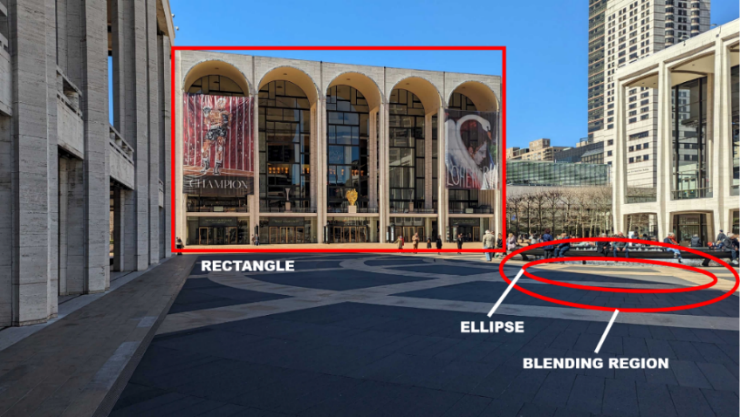
How it actually works
Standard HDR10+ already identifies the brightest pixel in each scene to guide its tone mapping. HDR10+ ADVANCED extends this by letting content creators define up to three specific areas per frame — each one a rectangle or ellipse — that get their own tone-mapping treatment. Ellipse-shaped zones can also include a surrounding “blending region,” which softens the transition so the adjustment doesn’t look like an obvious spotlight effect.
These zones aren’t limited to highlights and shadows, either. A creative team can apply Local Tone Mapping to a specific subject — a sunset, a special visual effect, or even a person’s face — giving them precise control over exactly how that part of the image should render on a given display.
What this means for the picture
The practical result is a more natural-looking image: highlight and shadow detail that would otherwise be lost to a single global curve stays intact, without the picture looking artificially flattened. It gives content creators a level of scene-by-scene, region-by-region control that standard tone mapping alone can’t offer.
Independent recognition of HDR10+’s tone-mapping approach
HDR10+’s tone-mapping technology has drawn attention from independent display experts. Writing for Display Daily, a display-industry analyst reported that Florian Friedrich — chair of the International Committee for Display Metrology’s HDR Subcommittee — considers HDR10+’s multi-point tone-mapping curve to be a notably refined approach, one that may rival or exceed Dolby Vision’s own method in some respects. The piece concluded that Samsung had made a credible case that HDR10+ is a true competitor to Dolby Vision on tone mapping, a rare instance of independent, technically grounded praise for the format’s approach to exactly the problem Local Tone Mapping is designed to solve.
Read the full Display Daily piece for the complete technical discussion.