


Your TV’s Colors Can Fade at Full Brightness — Here’s the Spec That Explains Why
Two displays can both claim excellent color gamut coverage and still look completely different in HDR — one holding rich, saturated color into its brightest highlights, the other washing out to pale, faded color at exactly the moment a scene gets most intense. The spec that explains the difference isn’t gamut. It’s color volume.
Gamut tells you the “what,” not the “when”
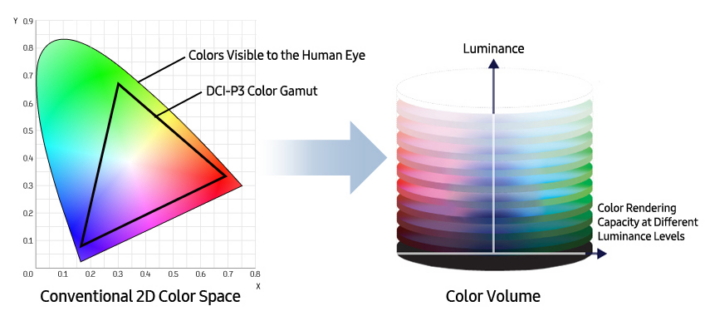
Color gamut describes which colors a display can reproduce — the range of hues and saturations, typically shown as a triangle on a flat chart. What that flat chart doesn’t capture is brightness: whether a display can still produce a fully saturated red, green, or blue when that color needs to appear very bright, or very dim. A display can cover a wide gamut on paper and still fail to deliver it at the luminance levels HDR content actually demands.
Why colors fade at the extremes
Producing a saturated color takes more from a display’s light-generating hardware as that color needs to get brighter — pushing a fully saturated red to near-peak brightness is a harder engineering problem than pushing a similarly bright but less saturated color. Displays with weaker color volume respond by desaturating: the color shifts toward white or gray rather than holding its intensity, which is exactly the “washed out at full brightness” look some HDR content can show on a lower-volume display, even when its gamut spec looked fine on the box.
Where this metadata actually lives in HDR10+
Base HDR10+ improves on HDR10 primarily through dynamic brightness and tone-mapping metadata, scene by scene — its color volume metadata (the gamut and reference values a display uses for color) stays static across the whole program, the same as HDR10. The scene-by-scene color layer is a HDR10+ ADVANCED capability, called Advanced Color Control: the encoder divides the color spectrum into twelve hue segments and records the maximum chroma (color intensity) reached in each one, per scene, giving ADVANCED-compatible displays more precise, up-to-date color information than a single static value can provide.
What this means when you’re comparing displays
A spec sheet that only lists gamut coverage — “90% DCI-P3,” for example — is telling you about color range at one unspecified brightness level, not necessarily the brightness levels that matter most in HDR content. Color volume performance is harder to reduce to a single number, which is part of why it gets talked about less than gamut, even though it’s frequently the bigger factor in how vibrant HDR content actually looks on a specific display.
Independent confirmation
Simple Home Cinema’s explainer on color volume in HDR describes it plainly: colour volume is essentially a display’s ability to reproduce saturated colors at different brightness levels, visualized as a three-dimensional model rather than the flat, two-dimensional triangle most gamut charts show.
Read Simple Home Cinema’s full explainer on color volume and calibration for more detail.