



Your Living Room Isn’t a Mastering Suite: How HDR10+ ADAPTIVE Handles Real-World Light
Every HDR movie or show is graded in a mastering suite with carefully controlled, very low ambient light — the way a colorist can be certain that what they see on the reference monitor is exactly what the content will look like. Your living room doesn’t work that way. Sunlight through a window at 2pm, a lamp on at night, an overcast afternoon — the light in the room where you actually watch changes constantly, and none of it matches the mastering suite HDR content was graded in.
Why ambient light is a real picture-quality problem
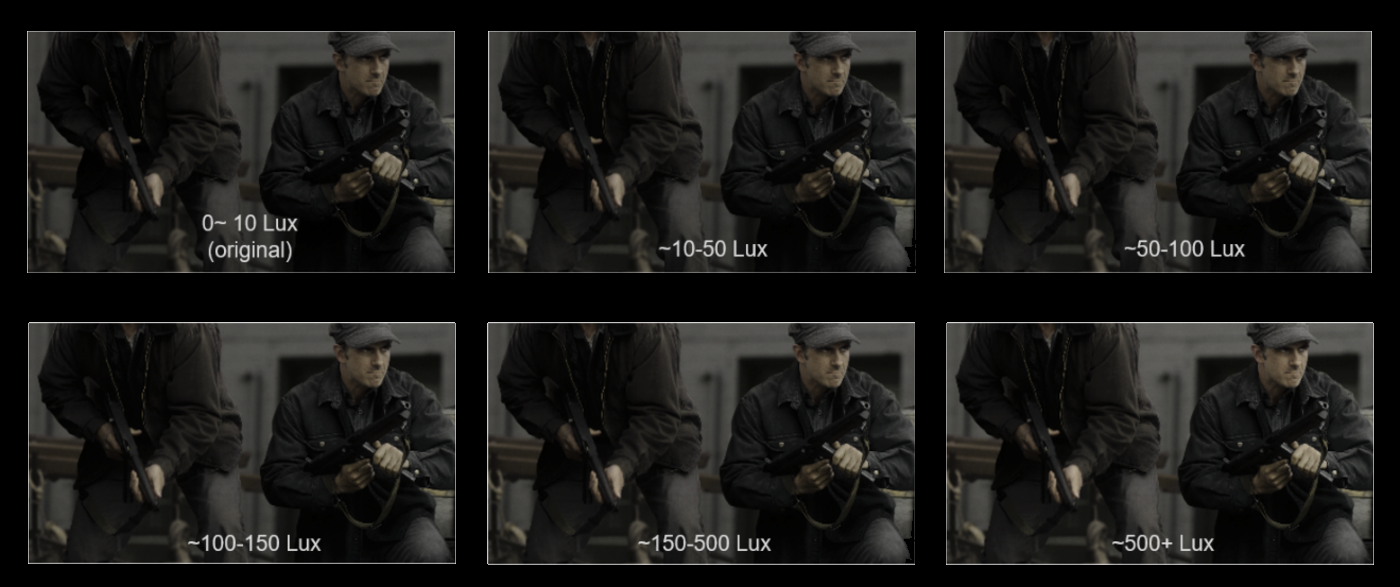
Bright ambient light in a room limits how much shadow detail you can actually perceive on screen, no matter how accurately the display reproduces it — the same physics that makes it hard to see your phone screen in direct sunlight applies, in a smaller way, to any TV. A scene mastered to reveal fine shadow detail in a dark mastering suite can lose that same detail to glare and reduced perceptual contrast in a bright room, even though the display itself hasn’t changed at all.
What HDR10+ ADAPTIVE actually does
HDR10+ ADAPTIVE addresses this by combining a display’s built-in light sensor with HDR10+’s existing dynamic metadata. As the room’s ambient light changes, the display continuously adjusts its presentation — scene by scene, using the same statistical metadata that already drives HDR10+’s standard tone mapping — to compensate for how much that light is affecting perceived shadow and highlight detail. A very dark scene watched in a very bright room gets the most adjustment, boosting visibility where glare would otherwise hide detail; a dark room needs little or no adjustment at all, since there’s no ambient light working against the picture in the first place.
Not all ambient adjustment works the same way
Automatic brightness adjustment for the room you’re in isn’t a new idea — laptops and phones have done a version of this for years, dimming or brightening the screen based on a light sensor reading. That’s a reasonable starting point, but on its own it treats every frame the same regardless of what’s actually on screen: the same fixed brightness boost gets applied whether the moment is a near-black nighttime shot or an already-bright daytime scene.
HDR10+ ADAPTIVE works differently. It reads the ambient light sensor the same way, but combines that reading with HDR10+’s own per-scene metadata — the shadow, mid-tone, and highlight statistics already carried in every HDR10+ program — so the compensation applied at a given light level is shaped by what that specific scene actually needs, not one curve applied uniformly across everything a viewer watches. The compensation curves themselves were also tuned against real viewer judgments during development, not just engineering approximation: people compared a title’s original creative intent, viewed on a reference monitor in a controlled setting, against the same content adjusted for a brighter target display, and the algorithm was calibrated until its automatic output matched what viewers judged to be a faithful restoration.
Preserving color, not just brightness
Tone-mapping approaches that adjust an image’s red, green, and blue channels independently can introduce a side effect that has nothing to do with brightness: colors shift or lose saturation, even when the exposure adjustment itself is doing exactly what it’s supposed to.
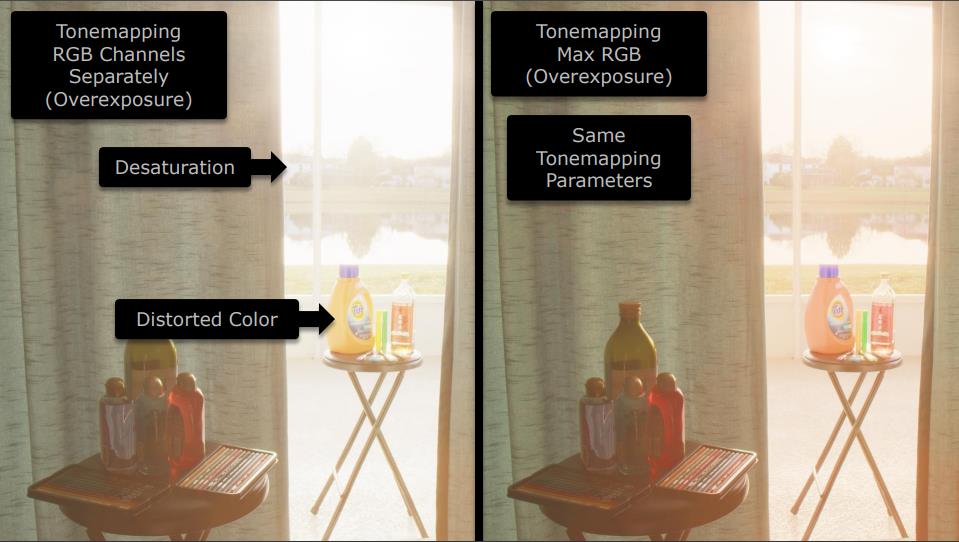
HDR10+’s tone mapping is built on MaxRGB from the start, and HDR10+ ADAPTIVE inherits that property rather than replacing it: hue is preserved in the same color space HDR10+ already uses, so ambient-light compensation adjusts brightness without quietly shifting what color something actually is.
No separate version of the content required
Content creators don’t need to master a second, “bright room” version of a title for this to work. A single HDR10+ program already carries what ADAPTIVE-compatible displays need — the standard scene-by-scene metadata plus the display’s own sensor reading of the room. That’s also why HDR10+ ADAPTIVE is designed to work alongside Filmmaker Mode rather than compete with it: Filmmaker Mode exists to show a title the way its creators intended, and ADAPTIVE’s job is compensating for the room the viewer happens to be sitting in, not changing the creative choices baked into the content. One doesn’t override the other — a display can respect Filmmaker Mode’s picture settings and still adjust for ambient light using the same underlying HDR10+ metadata.
Why this matters more than it might sound like
Most living rooms aren’t dedicated home theaters with controlled lighting — they’re rooms with windows, overhead lights, and lamps that get used at all hours. Without ambient-light compensation, a display can be technically accurate to the mastered content and still look worse in practice, simply because the room is fighting the picture. HDR10+ ADAPTIVE is a display-side answer to a viewing-conditions problem that no amount of source mastering alone can solve.
Independent confirmation
Digital Trends’ explainer on the feature describes it as automatically calibrating your TV’s image in response to your room’s changing conditions — a system built specifically to compensate for the gap between how content is mastered and the much less controlled conditions most people actually watch it in.
Read Digital Trends’ full explainer on HDR10+ ADAPTIVE for more detail.